The Delivery Display Screen: a KDS for your deliveries
A kitchen display screen (KDS) runs your line. The Delivery Display Screen (DDS) runs your delivery: every open order, every run and every driver on one screen at your door.
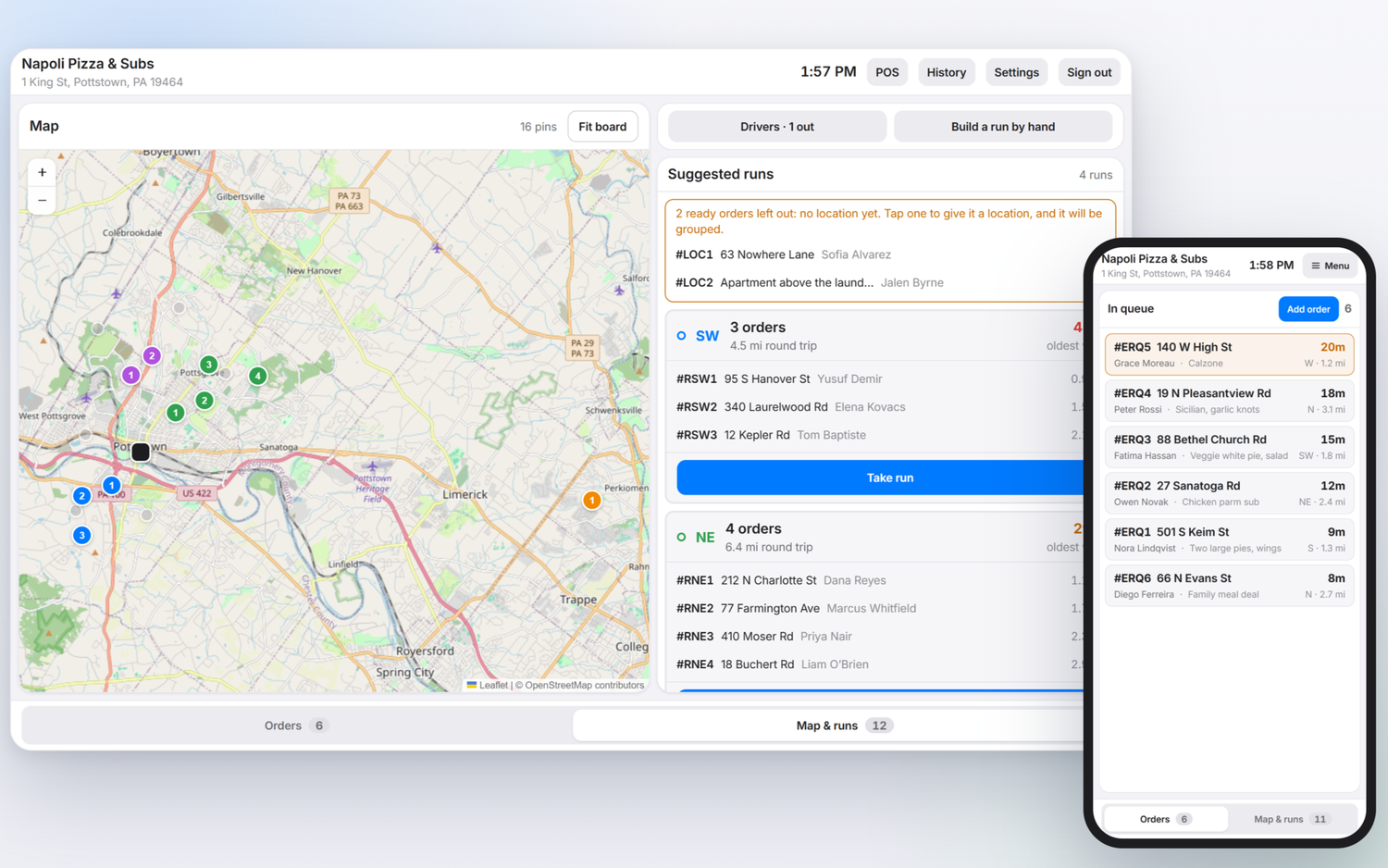
If you know a kitchen display screen, you already know the DDS.
Restaurants already trust a screen to run the kitchen. POS companies sell it, cooks work from it, and few kitchens would go back to paper tickets. The DDS does the same job for the other half of the night: the deliveries that have to get out the door and back.
| Compared on | Kitchen display screen (KDS) | Delivery Display Screen (DDS) |
|---|---|---|
| What it shows | Every ticket being made | Every delivery waiting to go out |
| What it decides | What gets cooked first | Which orders ride together, and in what order |
| Who stops guessing | The line | The drivers |
| What it replaces | Paper tickets on a rail | Drivers picking their own runs at the door |
| The result | Food out hot and on time | Deliveries out faster, drivers back more quickly |
Your kitchen already has a screen. Your deliveries should too.
One screen. Every delivery. Already in order.
This is the DDS at the pass: a map of every open delivery on the left, and the runs it suggests on the right.
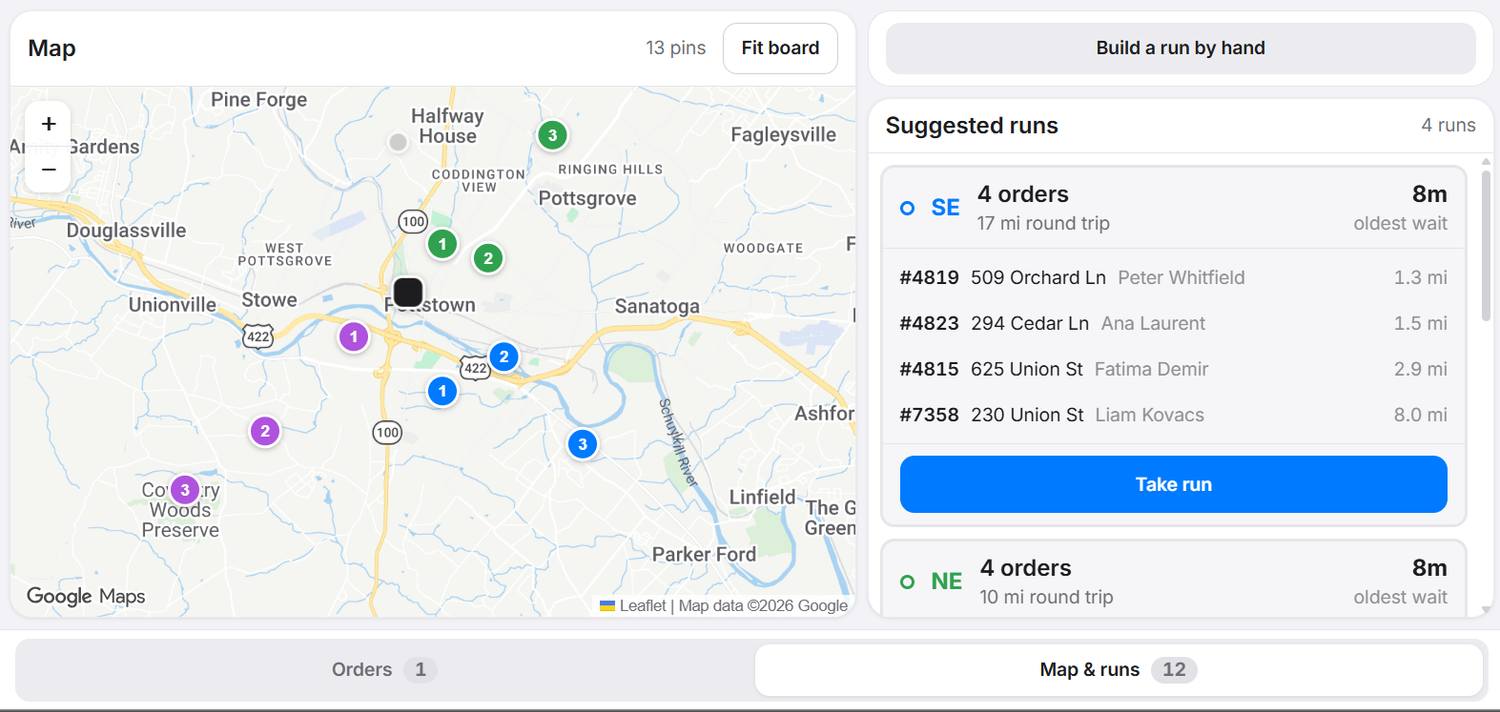
The map
Every open delivery is a pin, so you see the whole night at a glance. Orders that still need a location are flagged, and one tap fixes them.
Suggested runs
Ready orders heading the same way are grouped into runs of up to four, in driving order. An order joins a run once it is marked ready, so drivers are not left waiting at the door.
Take run
When a driver is ready, tap Take run. The driver scans a QR code for Apple Maps or Google Maps and goes: every stop in order, then back to your door.
Your call
Build a run by hand any time, and the DDS puts the stops in driving order. The limits are yours: deliveries per run, distance between stops and delivery radius, set store by store.
Flip the switch on a Friday rack.
Ten sample tickets: eight ready, two still in the kitchen. See who decides what leaves the door, and what changes with a Delivery Display Screen.
Sample orders for illustration, not real customers. Zones are example directions from the restaurant. Each restaurant sets its own deliveries per run, distance between stops and delivery radius.
Three steps. No driver app.
Orders land on the DDS
Toast delivery orders appear within seconds, address pinned. Not on Toast? Type an address. That’s all an order needs.
Runs build themselves
Ready orders heading the same way are grouped into runs of up to four, in driving order. The oldest order leads every run.
Drivers scan and go
Two QR codes, one for Apple Maps and one for Google Maps, open the whole route: every stop in order, then back to your door.
What you need: a tablet or screen where drivers pick up, and your own drivers. On Clover, that is two Clover screens: one at the packing station and one for drivers.
The DDS is the hub. Driver screens plug into it.
A KDS is one system with a screen at every station. Delivery works the same way: the DDS holds every delivery, and anything that needs to know where an order is plugs into it. We build the hub first, then the screens around it.
One DDS at the door. A screen wherever an order needs to be seen.
Vote on what we build nextRunning every night at Ice House Steaks & Pizza.
The DDS was built and tuned at a family restaurant in Pottstown, PA that has delivered with its own drivers since 1987.
The DDS sits beside your POS. It doesn’t replace it.
Toast
Read access today, with the restaurant’s own credentials. Orders show up on the DDS in near real time. Write access: not yet.
Clover, Version 1
Listed on the Clover App Market as an Android app, and used for testing.
Clover, Version 2
Built for the Clover POS, at the level the DDS needs to run delivery from start to finish.
Any other POS: type an address and the DDS builds the runs. No integration needed to start. Right now Clover is the only POS with BottomLine in its ecosystem, and here’s why that matters.
DDS questions, answered
What is a Delivery Display Screen (DDS)?
A Delivery Display Screen is the screen that runs a restaurant’s delivery, the way a kitchen display screen (KDS) runs the line. It shows every open delivery order on a map, groups ready orders into runs for your own drivers, and hands each driver the route. BottomLine Deliveries makes the DDS.
How is a DDS different from a KDS?
A KDS shows what the kitchen is making. A DDS shows what has to leave the building: which orders go together, in what order, and who takes them. They do different jobs and sit side by side.
Do I need to replace my POS?
No. The DDS sits beside your POS instead of replacing it. Toast delivery orders appear on their own within seconds. On any other system you type the address and the DDS builds the runs. A Clover version is planned for March 2027, and early access is open now.
Do my drivers need an app?
No. Drivers scan a QR code for Apple Maps or Google Maps and the route opens on their phone. No driver app, no PINs. Driver screens, phone apps that connect to the DDS, are on our roadmap, and you can vote for the Driver App on our features page.
What hardware does a DDS need?
A tablet or screen where drivers pick up. On Clover, that is two Clover screens that can run the app: one at the packing station and one for drivers.
Who is the DDS for?
Restaurants that run their own drivers. It was built at Ice House Steaks & Pizza in Pottstown, PA, which has delivered with its own drivers for 39 years.
Does the DDS replace DoorDash or Uber Eats?
No. Restaurants keep the apps for new customers and move their regulars in-house over time. The DDS helps own-driver delivery pay.
What is a driver screen?
A driver screen is an app on a driver’s phone that connects to the DDS. Today drivers scan a QR code. The first driver screen on our roadmap is the Driver App, where drivers punch out their orders and get directions on their phone.
Put a Delivery Display Screen at your door.
Tell us about your delivery and we’ll walk you through it. Founding restaurants get hands-on setup and early-access pricing.
Get early accessHow it worksClover is a trademark of its owner. Toast and other product names are trademarks of their respective owners. BottomLine is not affiliated with or endorsed by them.